
Introduction
Build n8n workflows with AgentBrains Knowledge Base, Conversation, Document Structuring, retrieval, triggers, and synthetic QA.
Introduction to AgentBrains n8n Nodes
The AgentBrains node pack connects n8n workflows to AgentBrains production APIs. This page covers package version 3.3.0.
Why use the node pack
You can call the AgentBrains APIs with raw HTTP nodes, but the dedicated nodes remove repetitive setup and make workflows easier to maintain.
| Benefit | What you get in n8n |
|---|---|
| Credential handling | Access tokens live in the n8n credential store instead of being repeated in every HTTP node. |
| Visual selection | Resources, operations, categories, indexes, and filters are selected from node fields. |
| Workflow-ready output | Responses are shaped for later n8n branching, formatting, and AI steps. |
| Faster production setup | You can connect workflows to Knowledge Base, Conversation, Document Structuring, retrieval, and QA without custom request chains. |
Install the package
AgentBrains ships as an n8n community node package: n8n-nodes-agent-brains.
Use version 3.3.0 or newer for Conversation and Document Structuring support.
n8n supports three installation paths for community nodes:
| Path | Best for | Notes |
|---|---|---|
| Nodes panel | Verified community nodes | Available from the canvas search panel for verified packages |
| Settings → Community Nodes | Self-hosted npm installation through the UI | Requires an Owner or Admin account |
| Manual npm install | Queue mode or private-package setups | Self-hosted only |
Recommended path for self-hosted n8n
- Open Settings.
- Go to Community Nodes.
- Select Install.
- Enter
n8n-nodes-agent-brains@3.3.0. - Confirm the community-node risk prompt.
Manual installation
If you install packages manually inside the n8n runtime container, install it from npm in ~/.n8n/nodes, then restart n8n:
mkdir -p ~/.n8n/nodes
cd ~/.n8n/nodes
npm install n8n-nodes-agent-brains@3.3.0
If you run n8n in Docker, open the container shell first and then run the same commands there.
Important limitations
- Manual npm installation is available on self-hosted n8n instances.
- Unverified community nodes are not available on n8n Cloud.
- Verified community nodes can also be installed directly from the nodes panel by instance owners or admins.
Configure credentials
Create one AgentBrains Integration API credential and reuse it across all nodes.
| Field | Description |
|---|---|
| Access Token | Generate it from the AgentBrains system integration page. |
| Custom Domain | Optional override for sandbox or a custom environment. Leave it empty to use the package default. |
The credential sends the token as the required API authentication header, so you do not need to manage request headers manually.
If you need help creating the token first, open Access API Key.
Choose the right node
| Node/resource | Best for | Typical outcome |
|---|---|---|
| AgentBrains Knowledge Base → Document | Create, retrieve, list, relate, filter, and update Knowledge Base entities/documents. | Your workflow reads or updates exact Knowledge Base records. |
| AgentBrains Knowledge Base → Category | Create, retrieve, list, filter, and update Knowledge Base categories. | Your workflow manages category structure or category-based filters. |
| AgentBrains Conversation | List conversations, retrieve history, and send outbound agent messages. | Your workflow inspects conversation context and continues a selected conversation. |
| AgentBrains Document Structuring | Start document structuring tasks and retrieve task status/result later. | Your workflow starts asynchronous document processing and polls for the result. |
| AgentBrains Integration Trigger | Starting an n8n workflow from AgentBrains. | A live AgentBrains conversation or external integration invokes your workflow webhook. |
| AgentBrains RAG | Semantic retrieval across indexes. | Your AI agent searches large knowledge collections without managing embeddings yourself. |
| AgentBrains Synthetic QA | Automated validation of agent behavior. | You get scored test conversations and a structured QA report. |
Recommended workflow patterns
Deterministic answer flow
Use Integration Trigger to receive the user request, then call Knowledge Base → Document when the answer must come from a specific policy, price list, instruction manual, or product sheet.
Conversation follow-up flow
Use Conversation → Get Many to find a conversation, Conversation → Get History for context, then Conversation → Send Agent Message to save an outbound agent reply.
Document intake flow
Use Document Structuring → Start Task with a document link, store the returned taskId, then use Wait, Schedule, Loop, or retry logic before calling Document Structuring → Get Task.
Hybrid agent flow
Use RAG as an AI tool for broad semantic search, then call Knowledge Base when the model needs an exact source document or image.
Quality gate flow
Use Synthetic QA in a validation workflow after prompt, policy, or automation changes.
What the nodes map to
| n8n resource | Use it for | Public HTTP API |
|---|---|---|
| Knowledge Base → Document | Create, retrieve, list, relate, filter, and update Knowledge Base entities/documents. | /knowledge-base/entities and related entity routes |
| Knowledge Base → Category | Create, retrieve, list, filter, and update Knowledge Base categories. | /knowledge-base/categories and related category routes |
| Conversation | List conversations, retrieve history, and send outbound agent messages. | /conversations |
| Document Structuring | Start document structuring tasks and retrieve task status/result. | /structuring/tasks |
| RAG | Discover indexes and retrieve semantic matches. | /knowledge-base/indexes and /knowledge-base/retrieve |
| Integration Trigger | Register workflow webhooks. | AgentBrains workflow trigger integration |
| Synthetic QA | Start and inspect QA runs. | AgentBrains QA integration |
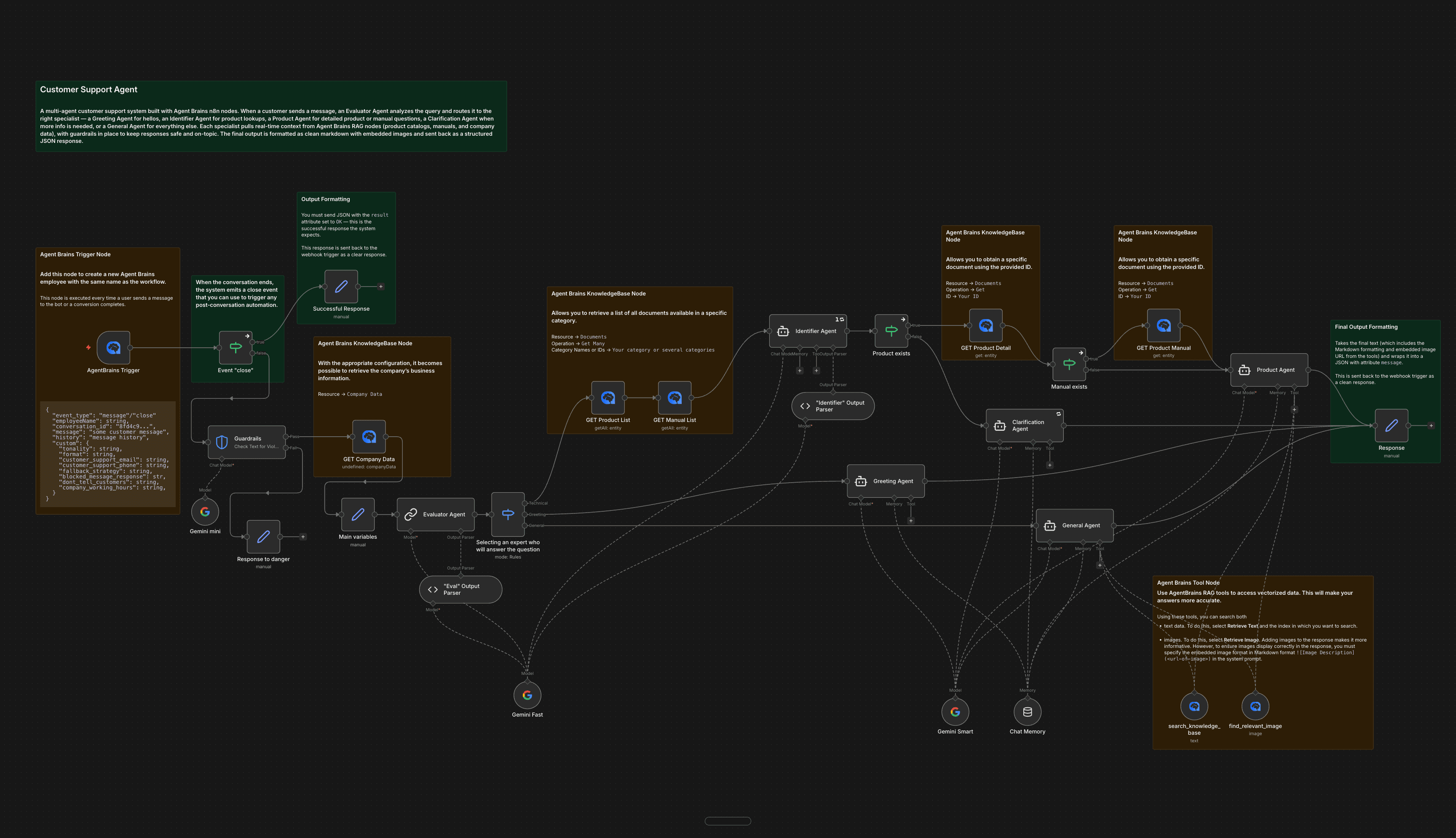
Node Interface
Here is how the AgentBrains nodes look in n8n:
Next steps
- Open Access API Key if you still need to create or organize your integration credentials.
- Open AgentBrains Knowledge Base for document and category operations.
- Open AgentBrains Conversation to list conversations, retrieve history, or send an agent message.
- Open AgentBrains Document Structuring to start document processing and retrieve task results.